I am a full-stack developer with 5 years of experience in the field. I specialize in PHP, Laravel, React and React Native, and have a track record of building high-performing, scalable and user-friendly web and mobile applications. With a strong understanding of web development principles and a passion for staying up-to-date with the latest technologies, I am able to deliver high-quality solutions that meet the needs of my clients. I am a team player with strong communication skills and the ability to adapt to new challenges. I am always looking to improve my skills and take on new projects that will push me to grow as a developer.
The use of Git for us Devs is something essential, whether in personal projects, open source with many people or an entire community.
Given that, we must use git commit properly. Having a coherent and standardized language helps everyone involved in the project to understand the changes that have occurred.

In the image above, we see how harmful a poorly commented commit can be, since we fail to understand the nature of the change that occurred and the context of it. In the long run, the effect is even more damaging, as the maintainability of the software suffers due to inconsistencies in the scope of these changes, and how they have affected the project in the past.
With that in mind, let's talk a little about Conventional Commits Pattern.
What Is It?
Conventional Commit is a simple convention for commit messages, which follows a set of rules and helps projects to have an explicit and well-structured commit history.
How To Use It?
The rules are very simple, as shown below we have a type of commit, the context (scope) of the commit and the message (subject) of the commit.
!type(?scope): !subject
<?body>
<?footer>
Thus, ! indicates the mandatory attributes and ? indicates optional attributes.
Subject: Imperative instead of past tense
In this way, we are telling our team what the commit will do if applied.
“If applied, this commit will ”
“If applied, this commit will change the markup”, which makes a lot more sense than: “If applied, this commit will change the markup”

Type: What are the types of commits
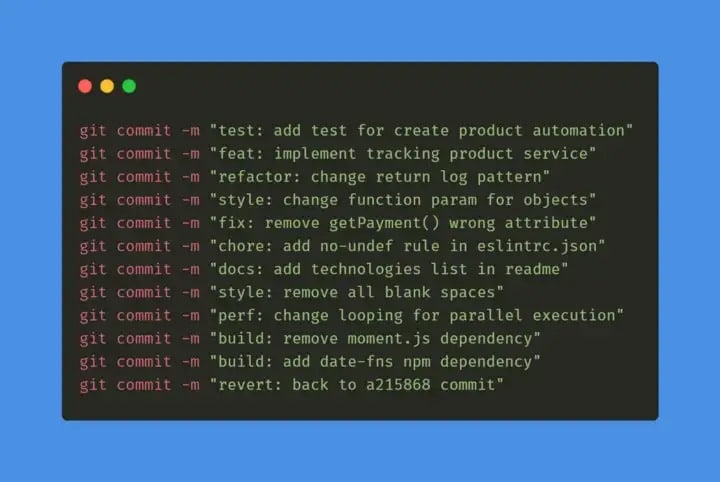
The type is responsible for telling us what change or iteration is being made, from the convention rules, we have the following types:
test: indicates any type of creation or alteration of test codes.
Example: Creation of unit tests.feat: indicates the development of a new feature for the project.
Example: Adding a service, functionality, endpoint, etc.refactor: used when there is code refactoring that does not have any impact on the system logic/rules.
Example: Code changes after a code reviewstyle: used when there are code formatting and style changes that do not change the system in any way.
Example: Change the style guide, change the lint convention, fix indentations, remove white spaces, remove comments, etc…fix: used when correcting errors that are generating bugs in the system.
Example: Apply handling for a function that is not behaving as expected and returning an error.chore: indicates changes to the project that do not affect the system or test files. These are developmental changes.
Example: Change rules for eslint, add prettier, add more file extensions to .gitignoredocs: used when there are changes in the project documentation.
Example: add information in the API documentation, change the README, etc.build: used to indicate changes that affect the project build process or external dependencies.
Example: Gulp, add/remove npm dependencies, etc…perf: indicates a change that improved system performance.
Example: change ForEach to While, etc…ci: used for changes in CI configuration files.
Example: Circle, Travis, BrowserStack, etc…revert: indicates the reversal of a previous commit.
Note:
Only one type per commit;
The type is mandatory;
If you don’t know which type to use, it is probably a big change and it is possible to split this commit into two or more commits;
The difference between
buildandchorecan be quite subtle and can lead to confusion, so we must be aware of the correct type. In the case of Node.js, for example, we can think that when there is an addition/change to a certain development dependency present indevDependencies, we usechore. For changes/additions of common dependencies to the project, and that have a direct and real impact on the system, we usebuild.
Scope: contextualizing the commit
At this point — and following past conventions — we managed to understand the type of change that was made in the commit (commit type) and clearly understand what the commit will bring if applied (commit subject).
Even though the scope is not mandatory, it can be used to contextualize the commit and bring less responsibility to the subject, making it as brief and concise as possible. Remembering that the scope must be inserted in the commit between parentheses.
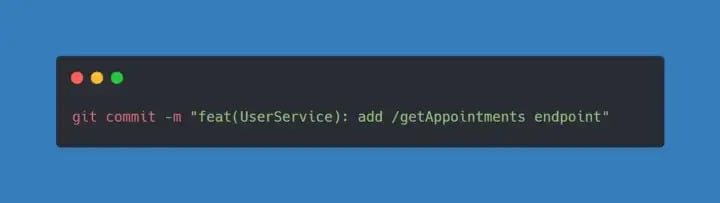
Note: Scopes must be separated with /
Conclusion
I wrote this article to record one of my learnings (they were just some notes in the notion app), but I hope it can help other devs out there.